
.png)
Description
Download What To Read After – AI Book Recommendation Tool
Overview
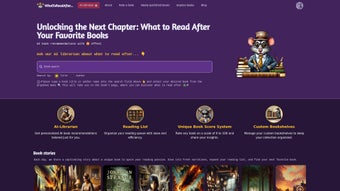
In an age where the sheer volume of published titles can feel overwhelming, finding the next book that truly resonates with your personal taste is a genuine challenge. What To Read After steps in as an AI‑driven literary companion, turning the discovery process into a seamless, enjoyable experience. Powered by an animated AI librarian named Robo Ratel, the platform learns from your reading history by asking you to rate just two books. From that modest input, the system instantly generates a curated list of recommendations drawn from a vast catalog of top‑rated titles across fiction, non‑fiction, mystery, sci‑fi, romance, and more.
The tool doesn’t stop at simple suggestions. It also showcases the “Best Books of the Month” and “Best Books of the Year” collections, giving users a quick glance at critically acclaimed works and hidden gems. Users can organize their discoveries into virtual bookshelves, set up reading queues, and keep track of titles they’ve already explored. The intuitive main menu provides one‑click access to rating books, browsing newly released titles, and learning more about the platform’s capabilities.
What makes this app especially compelling for avid readers is its focus on personalization without demanding an extensive questionnaire. By leveraging modern machine‑learning algorithms, Robo Ratel interprets subtle preferences—like narrative pacing, character development, and thematic depth—to surface books that align with your unique literary palate. The result is a secure, free, and constantly updated tool that feels like a personal librarian available on any device.
Key Features That Set What To Read After Apart
- AI‑Powered Personalization: Robo Ratel analyses your ratings to generate hyper‑relevant book suggestions within seconds.
- Minimal Input Required: Only two rated books are needed to kick‑start the recommendation engine.
- Curated “Best Of” Lists: Monthly and yearly top‑book collections keep you informed about trending and timeless reads.
- Virtual Bookshelves: Create, edit, and organize multiple shelves to separate genres, reading goals, or wish‑lists.
- Reading Queue Management: Drag‑and‑drop titles into a queue that automatically updates as you finish books.
- Cross‑Platform Accessibility: Available as a web app and native applications for Windows, macOS, Android, and iOS.
- Secure Data Handling: All user data is encrypted, and no personal information is sold to third parties.
- Regular Updates: The recommendation database is refreshed weekly to include new releases and emerging authors.
- Community Insights: View community ratings and comments for each recommendation to gauge popularity.
- Easy Navigation: A clean main menu with clear icons for “Rate Books,” “Explore New Releases,” and “My Shelves.”
Each feature is designed with the reader in mind, ensuring that the journey from discovery to reading is frictionless. The AI engine’s ability to adapt over time means that the more you interact with the app, the sharper its suggestions become. Whether you’re a casual reader looking for a weekend escape or a literary scholar hunting for the next award‑winning novel, the breadth of options and depth of personalization make What To Read After a standout tool in the crowded landscape of book recommendation services.
Installation, Setup & Compatibility
Downloading the App
Getting started with What To Read After is straightforward. For desktop users, visit the official website and click the “Download for Windows” or “Download for macOS” button. The installer is a lightweight, signed executable (≈ 25 MB) that runs securely on Windows 10/11 and macOS 10.14 or later. Mobile users can find the app on Google Play Store (Android 6.0+) and Apple App Store (iOS 13+). All versions are free, with optional in‑app purchases for premium features such as advanced analytics on reading habits.
Step‑by‑Step Installation
- Visit whattoreadafter.com/download and select your operating system.
- Save the installer file and run it. Follow the on‑screen prompts to accept the license agreement and choose an installation folder.
- Launch the application; the first‑time setup wizard will ask you to create a free account using an email address or social login (Google, Apple).
- After account creation, you’ll be prompted to rate at least two books you’ve read. Use the built‑in search to find titles and assign a 1‑5 star rating.
- Once the ratings are saved, Robo Ratel will generate your personalized recommendation list, which appears on the home screen.
Compatibility and System Requirements
- Windows: 10, 11 (64‑bit); minimum 2 GB RAM, 200 MB free disk space.
- macOS: 10.14 Mojave or newer; 2 GB RAM, 200 MB disk space.
- Android: 6.0 Marshmallow or later; 1 GB RAM, 100 MB storage.
- iOS: 13.0 or later; 500 MB free storage.
The web version works on any modern browser (Chrome, Firefox, Edge, Safari) without the need for additional plugins. Because the app syncs data to the cloud, you can switch between devices seamlessly—your bookshelves, ratings, and reading queue stay consistent across Windows, macOS, Android, and iOS.
Pros, Cons, FAQ & Final Verdict
Pros & Cons
- Pros:
- Highly accurate AI recommendations after just two ratings.
- Free to use with optional premium upgrades.
- Cross‑platform support ensures accessibility on all major devices.
- Secure, encrypted data handling protects user privacy.
- Regular content updates keep the catalog fresh.
- Cons:
- Premium features (e.g., detailed reading analytics) require a subscription.
- Internet connection needed for real‑time recommendations.
- Some niche genres may have fewer titles in the recommendation pool.
Frequently Asked Questions
Is What To Read After really free?
Yes, the core recommendation engine, virtual bookshelves, and reading queue are completely free. A optional premium tier adds advanced analytics and ad‑free experience.
How does the AI know my preferences after only two ratings?
Robo Ratel uses collaborative filtering combined with genre‑level feature extraction. By comparing your two rated books with millions of other users’ profiles, the algorithm identifies patterns that match your taste.
Can I import my existing reading list from Goodreads or Kindle?
Yes, the app offers CSV import and direct OAuth connections to Goodreads. Kindle integration is planned for a future update.
Is my data safe?
All user data is encrypted at rest and in transit using TLS 1.3. The company’s privacy policy explicitly states that no personal data is sold to third parties.
Do I need an internet connection to use the app offline?
You can browse previously cached recommendations and manage your bookshelves offline, but generating new suggestions requires an active internet connection.
Conclusion & Call to Action
What To Read After bridges the gap between overwhelming choice and curated discovery with a blend of AI intelligence and user‑friendly design. Its ability to generate spot‑on recommendations after minimal input makes it an essential companion for anyone who loves to read but struggles to decide what to pick next. The free tier offers ample functionality for casual readers, while the optional premium upgrade provides deeper insights for bibliophiles who track every reading metric.
If you’re ready to elevate your reading journey, download What To Read After now and let Robo Ratel guide you to your next literary adventure. Experience a secure, constantly updated, and AI‑powered way to discover books you’ll truly love.
Overall rating: 4.5/5 – The app delivers impressive personalization, seamless cross‑platform sync, and a clean UI. Minor drawbacks are the reliance on internet connectivity and limited niche‑genre depth, but these are outweighed by the value it adds to any reader’s toolkit.
Guides & Tutorials for What To Read After
How to install What To Read After
- Click the Preview / Download button above.
- Once redirected, accept the terms and click Install.
- Wait for the What To Read After download to finish on your device.
How to use What To Read After
This software is primarily used for its core features described above. Open the app after installation to explore its capabilities.
User Reviews for What To Read After 0
No reviews found




